
Learn how to install the Seren Kodi addon on Firestick, Android TV, PC, and Mac, complete with Real-Debrid setup, provider packages, and essential privacy tools.

The Seren video addon remains one of the premier third-party streaming tools available on Kodi. Unlike traditional scrapers that pull hit-or-miss hoster streams, Seren pairs directly with premium debrid multi-hosters (such as Real-Debrid, AllDebrid, and Premiumize) to deliver high-speed 4K and 1080p torrent caches without buffering.
Whether setting up a fresh device or upgrading from an older version, this comprehensive 2026 walkthrough explains how to add Seren Kodi step-by-step.
Table of Contents
Why You Need a VPN When Streaming on Kodi
Disclaimer: Streaming copyrighted content via third-party addons without authorization may violate local laws. Always verify the public-domain status of content before playback.
When using video scrapers on Kodi, internet service providers (ISPs) can monitor data transfers, throttle streaming bandwidth, and log online requests. Furthermore, debrid services tie all playback requests directly to your home public IP address.
Stream Safely with NordVPN
Using NordVPN alongside Kodi keeps your streaming activities shielded from third-party observation:
- Bypass ISP Throttling: Stop video buffering caused by artificial network throttling.
- Military-Grade Encryption (AES-256 / NordLynx): Secures all incoming and outgoing connections.
- Strict No-Logs Policy: Verified by independent audits to ensure zero connection history is logged.
- Cross-Platform Compatibility: Native apps available for Amazon Fire TV Stick, Android TV, Windows, macOS, and Linux.
👉 [Exclusive Offer: Protect Your Streaming with NordVPN (Save up to 70% + 3 Months Free)]
Prerequisites: Preparing Kodi for Unknown Sources
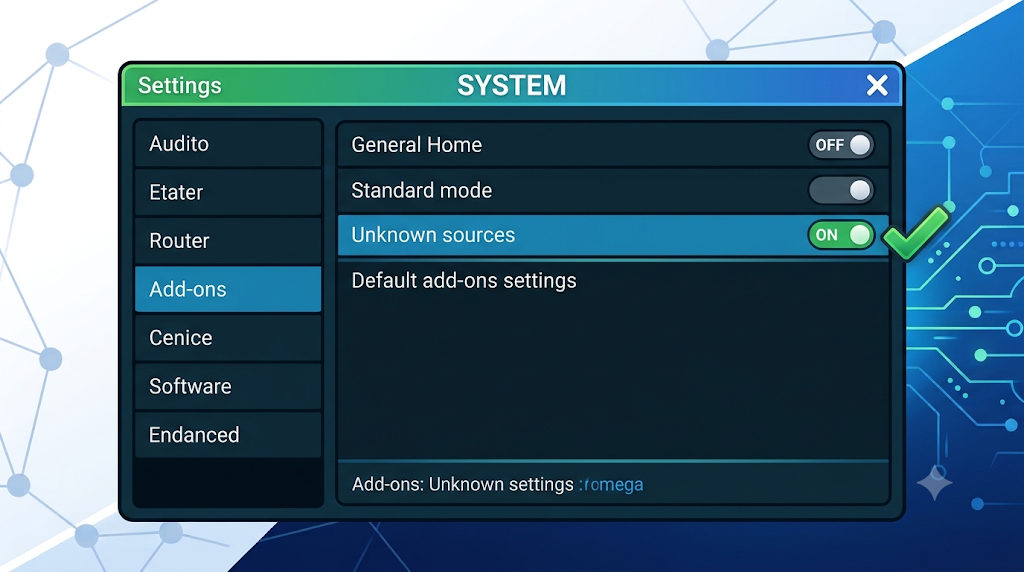
Before you can perform a Seren Kodi addon install, Kodi’s default security restriction blocking third-party zip archives must be lifted.
- Launch Kodi and select the Settings Gear in the top-left corner.
- Click on System.
- Hover over Add-ons on the left menu, then toggle Unknown Sources to ON.
- When prompted by the security warning, choose Yes to confirm.
Step 1: Add the Seren Addon Repository Source
To download the required repository zip, provide Kodi with the official Seren Kodi addon GitHub package mirror.
- Return to the main Settings menu and select File Manager.
- Click Add source on either side of the screen.
- Click
<None>and enter the following repository address exactly:https://nixgates.github.io/packages(Alternative mirror if down:https://bbviking.github.io/) - In the box labeled Enter a name for this media source, type
nix(ornixgates) and select OK. - Click OK once more to save the source.
Step 2: Install Nixgates Repo from Zip File
Next, unpack the Seren addon zip download package containing the repository.
- Go back to the Kodi home screen and click Add-ons on the left sidebar.
- Click the open box icon (Add-on Package Installer) in the top-left.
- Select Install from zip file.
- Choose nix (the name created in the previous step).
- Click
repository.nixgates-2.2.0.zip. - Wait a few moments until the notification banner reading “Nixgates Repo Add-on installed” appears in the top-right corner.
Step 3: Install Seren Video Addon from Repository
- From the same Add-ons menu, select Install from repository.
- Click Nixgates Repo.
- Open Video add-ons.
- Select Seren and click Install at the bottom-right.
- If Kodi prompts with a list of additional dependencies, click OK to install them all.
- Wait for the popup stating “Seren Add-on installed”.
Step 4: Configure Seren Providers & Scrapers
Important: Unlike older addons, Seren does not ship with built-in scrapers. If you try searching immediately, you will get a blank list or a “no sources found” notification. You must add provider packages to retrieve any stream files.
- Open Seren, then navigate to Tools > Provider Tools.
- Select Manage Provider Packages.
- Click Install Package > Web Location.
- Enter the provider URL:
http://bit.ly/a4kScrapers - Click OK, then click Install when prompted.
- A success dialog will confirm the provider package is installed and active.
Step 5: Authorize Real-Debrid / Premium Cloud Account
Seren exclusively relies on premium debrid services. A free-tier resolver will not produce results.
- Inside Seren, open Tools > Open Settings Menu.
- Navigate to the Accounts tab on the left.
- Enable your preferred service (e.g., Real-Debrid, Premiumize, or AllDebrid).
- Select Authorize Real-Debrid (or your selected provider).
- An authorization code will appear on screen. On your phone or PC browser, visit
[https://real-debrid.com/device](https://real-debrid.com/device)and enter the code. - Once validated, Seren will refresh and display your account name and expiration status.
Step 6: Connect NordVPN
To safeguard your bandwidth from speed limit constraints and shield activity logs from visibility while streaming:
- Launch your device’s App Store and install NordVPN.
- Connect to an optimal server.
- Return to Kodi. Run Seren with full peace of mind.
Troubleshooting: Seren Kodi Addon Not Working?
If you encounter issues such as “Seren addon not working”, crashes, or empty lists, run through these common fixes:
| Common Issue | Root Cause | Solution |
| No Streams / No Links Found | Missing scrapers or expired debrid subscription | Ensure Real-Debrid active days remain; re-install [http://bit.ly/a4kScrapers](http://bit.ly/a4kScrapers). |
| Connection Timeout Error | ISP blocking scraper indexers | Connect to NordVPN before launching Kodi to bypass ISP DNS blocks. |
| Trakt Sync Errors | Stale OAuth session tokens | Go to Tools > Trakt Sync Tools, disconnect, and re-authorize your Trakt account. |
| Dependency Installation Failed | Corrupted package cache | Clear Kodi cache via Tools > Clear Cache, or manually update your Kodi version. |
Final Thoughts & Security Checklist
Seren remains a gold standard for fast, high-bitrate streaming on Kodi. By combining Seren with Real-Debrid for cached torrents and NordVPN for privacy and anti-throttling, you can unlock smooth 4K playback on any device.
🔐 Ready to stream privately?
[Get NordVPN with up to 70% Off Today]